


1
 Show Posts
This section allows you to view all posts made by this member. Note that you can only see posts made in areas you currently have access to.
2
Modding / Re: Is it possible to create recipes that create 2 objects?
« on: September 13, 2025, 08:06:52 PM »
If you mess w/ memory hacking at all you can program the behaviors yourself. For example, I've made a working prototype for item containers, recipes you can 'learn' and recipes that are only available to use when a certain NPC is within range.
heres a video of the container prototype:
https://www.youtube.com/watch?v=rQQu_Ndc1kc
from my original thread:

heres a video of the container prototype:
https://www.youtube.com/watch?v=rQQu_Ndc1kc
from my original thread:
3
Modding / Re: Custom Tiles not showing (FIXED)
« on: September 09, 2025, 02:07:36 AM »
You can use F9 ingame to reload truetile files for easier testing purposes.
4
Mod Releases / Re: [3.86~] URWME v1.0.1 [WIP]
« on: August 05, 2025, 03:03:37 AM »
v1.0.1 (8/4/25)
- Added cannibalism, teleport to, turn towards, checksum fix.
- Updated no needs to set to optimal need levels.
- Fixed misaligned stats (Flail is still listed for use with previous versions)

edit: added project to github
https://github.com/Nighticus/URWME
- Added cannibalism, teleport to, turn towards, checksum fix.
- Updated no needs to set to optimal need levels.
- Fixed misaligned stats (Flail is still listed for use with previous versions)
edit: added project to github
https://github.com/Nighticus/URWME
5
Mod Releases / Re: [3.86~] URWME v1.0.0 [WIP]
« on: July 31, 2025, 01:24:20 AM »You get this error after editing... er, multiple values at once? Replicate by changing the values by typing in the number. (Afaik...)
Wait, I narrowed it down. I think that setting everything in Physical Profile to 18 is impossible as the error pops up when everything is at max.
Also, the following skills skills seem to be swapped.
Actual | Editor
Cookery = Stealth (Increase Stealth in editor = Cookery ingame)
Fishing = Swimming
Timbercraft = Skiing
Netmaking = Fishing
Bowyer = Netmaking
Physician = Cookery
Skiing = Timbercraft
Stealth = Climbing
Climbing = Physician
Swimming = Timbercraft
For the combat skills section...
Game version has removed the flail skill, editing skills shifts up by one starting from the spear location
Flail editor = Spear ingame
Spear editor = Bow ingame
Bow editor = Crossbow
Crossbow = Unarmed
Unarmed = Not used
Tldr:
1: Physical profile doesn't allow setting max 18 of everything
2: Lore & Craft skills + Physical skills have their skills swapped around when translating from editor to actual game
3: Combat skills error, skills shifted up by one starting from the spear section
! Note, this is a new save game file created in 3.86.1 stable.
Thanks for the report, I've been busy with a lot of stuff recently so haven't been able to address this quite yet.
I'll add a fix for the checksum next post
6
Mod Releases / [3.86~] URWME v1.0.1 [WIP]
« on: May 16, 2025, 11:09:07 PM »
[3.86~] URWME v1.0.1
Has some basic features to edit your character and item properties (no inventory yet)
Right click to access context menu, editors (character and item) open in a web browser.
Cheats:

A lot more planned features.
Version History:
Please report any bugs to me via this thread, my PMs, or contact me directly on steam:
https://steamcommunity.com/id/Nightipoo/
Download attached to thread.
Credits:
Night - Creator/Programming.
Enormous Elk - Unreal world.
Requires .NET 9.0 to run.
Has some basic features to edit your character and item properties (no inventory yet)
Right click to access context menu, editors (character and item) open in a web browser.
Cheats:
- No Needs
- No Carry Weight
- Xray / Tree vision
- Cannibalism
- Disable Checksum (enabled by default)
- Teleport to (when using [l]ook)
- Turn towards (when using [l]ook)
A lot more planned features.
Version History:
- v1.0.1 (8/4/25)
- Added cannibalism, teleport to, turn towards, checksum fix.
- Updated no needs to set to optimal need levels.
- Fixed misaligned stats (Flail is still listed for use with previous versions) - v1.0.0 (5/16/25)
- Initial release
Please report any bugs to me via this thread, my PMs, or contact me directly on steam:
https://steamcommunity.com/id/Nightipoo/
Download attached to thread.
Credits:
Night - Creator/Programming.
Enormous Elk - Unreal world.
Requires .NET 9.0 to run.
7
Mod Releases / Re: [3.86~] URWSSSelector v1.0.4
« on: May 16, 2025, 10:24:37 PM »
~Updated to 3.86
Should also work on older/newer versions of the game.
Should also work on older/newer versions of the game.
8
Modding / Re: [Info] [3.84.2] Cheat Engine Addresses
« on: November 20, 2024, 08:06:18 PM »Does anyone have a step-by-step guide on how to add or remove items? Or change items to be other items? Because none of the Hex Editing guides make any sense, and the Hex ID list is no longer correct.
here you go:
https://www.youtube.com/watch?v=z1TbS1evSzQ
9
General Discussion / Re: Hunting mode?
« on: October 24, 2024, 04:17:24 AM »If you want, you can use cheat engineWhat cheat engine?and freeze the value that indicates when you've climbed to the top of a tree, when used on the overworld map it'll show you where animals are at a far greater distance and frequencyHmmm, I am not sure though, if that wouldn't be too easy? With so much vision you could probably lose an animal, and then just immediately find it on the world map.depending on where you are on the map, season, time of day, and stats, you'll see more or less animalsSeason? Time of day? So probably more animals in spring-autumn, less in winter, and best time would be small hours?
heres a video/tutorial on cheat engine, and some basic concepts:
https://www.youtube.com/watch?v=X8m_SqrXK7c
Of course, you will have to use it at your own discernment. If you feel it's too easy, you can always disable it after you've made the first initial encounter.
As for the animal spawns, I don't know the exact specifics, but i do know these things impact what you see. I mentioned time of day because during night hours your vision lessens
 .
.
10
General Discussion / Re: Hunting mode?
« on: October 24, 2024, 02:17:01 AM »There are more animals farther away from humans. You'll not find as many in Driik. Also, if you wander back and forth about an area, or in circles, you're more likely to find animals than if you just go in a straight line.I know that. I lived on the edge of Reemi, and would look for animals in no man's land, but there still weren't too many of them...
Maybe it's possible to modify spawn rates or something, so there is X times more of all animals, or certain types of them?
Or how about leaving food on the ground? Maybe it would attract animals, and give me a better chance of stumbling onto an animal or their tracks if I checked those locations regularly?
If you want, you can use cheat engine and freeze the value that indicates when you've climbed to the top of a tree, when used on the overworld map it'll show you where animals are at a far greater distance and frequency. I'll post a screenshot in a bit.
left image shows your vision normally. right image shows it with the 'is in tree' value set. i moved around a little to see if i could find anything quickly.
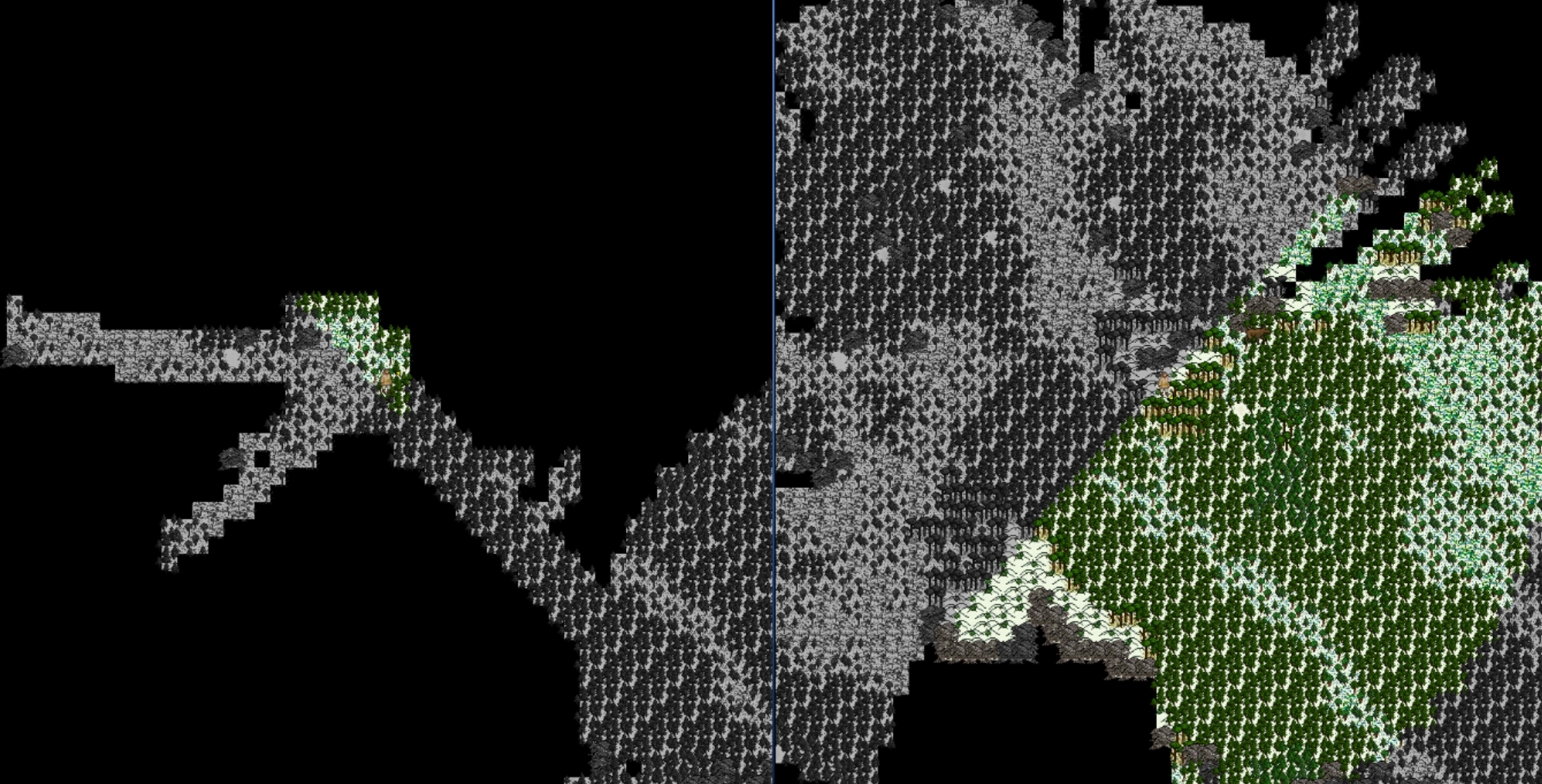
depending on where you are on the map, season, time of day, and stats, you'll see more or less animals
urw.exe+5F97DAA is the address, freeze to 1.
11
Modding / Re: [Info] [3.84.2] Cheat Engine Addresses
« on: October 17, 2024, 06:22:49 AM »Hello all, and thank you for populating this thread and having done what you've done so far.
To clarify, I had absolutely 0 experience with Cheat Engine before embarking on this misadventure.
I am interested in editing attributes (I am that guy who always pressed ctrl-8 when playing Baldur's Gate because I couldn't be bother rerolling stats all the time, sorry). Unfortunately, from what I understand, the cheat tables that have been uploaded are not usable for Mac. Fortunately, I am fairly certain that I have located the attribute addresses. Unfortunately again, I cannot be completely certain because even when I am editing and locking the values there is no change in the character creation UI. Is this supposed to be the case or am I completely on the wrong track? Sorry if it's a dumb question guys
Edit: Noticed that after rolling multiple times, every once in a while impossible values (all attributes except one being maxed) corresponding to the changed address values come up in the UI. Then completely random again next roll. So now I am just even more confused.

You're correct, when locking the values its not always going to update the UI correctly in character creation, but the values are set. Once your character is in the game and complete you can navigate to the character info menu (P key) and double check to see if your values are setting correctly.
12
Modding / Re: [Info] [3.84.2] Cheat Engine Addresses
« on: October 17, 2024, 02:14:09 AM »
~Updated to 3.84.2
13
Mod Releases / Re: [3.84] URWSSSelector v1.0.3
« on: July 02, 2024, 06:05:26 PM »
~Updated to 3.84.2
14
Mod Releases / Re: [Outdated][3.71][3.63][3.62] URWCharacterMenu v1.0.4b
« on: June 28, 2024, 10:33:56 AM »It'd be great if your up to it bud also hit me up if you want to spread the knowledge, not sure how to do the update but if you teach me a bit i'd be happy to help with it in future.
Sent you a PM; I just finished a recording on obtaining some of the addresses and general cheat engine usage. Never really edited videos before and no idea how long of a video I can upload to youtube, but recording ended up being about an hour long. hopefully I can trim some of it up, kinda just dove into it with no real plan or experience so.
With that said, updated some of my addresses as a byproduct so, there's that!
Still brainstorming/experimenting with making everything for URWCharacterMenu ported into the game UI and hotkeys, but idk. Hard to decide what the best course of action is.
edit: just checked the recording and realized I messed up on one of the source resolutions so only half my screen got captured ;'(

Will have to redo it.
15
Suggestions / Re: Make Menu only for Modded items = saving BAC and other large mods
« on: May 08, 2024, 06:10:37 AM »
Just wanted to post on this- i think an additional key for modded menus is a good idea.
I implemented my own version in my old mod extender project, using the ~ key would bring up an external menu with mods and their designated key. then, when one of the keys gets activated, it would get the menu def information and write it into the games menu def files, save, and then macro the keys into that menu, so you dont need to manually open up the crafting menu and all that, allows for infinite menus, as you're able to exchange mod menus with a single key (i used Z)
Could probably be done with a simple keyboard/autohotkey interface if you want to avoid UI, which is the way i had mine setup.
Idk if this is useful to anyone, but to give you an idea of how it works in code:
I implemented my own version in my old mod extender project, using the ~ key would bring up an external menu with mods and their designated key. then, when one of the keys gets activated, it would get the menu def information and write it into the games menu def files, save, and then macro the keys into that menu, so you dont need to manually open up the crafting menu and all that, allows for infinite menus, as you're able to exchange mod menus with a single key (i used Z)
Could probably be done with a simple keyboard/autohotkey interface if you want to avoid UI, which is the way i had mine setup.
Idk if this is useful to anyone, but to give you an idea of how it works in code:
Code: [Select]
private void ModManager_KeyDown(object sender, KeyEventArgs e) // Hide/Show extended menus
        {
            if (e.KeyCode == Keys.Escape)
            {
                this.Hide();
                //MainForm.Show();
                //WindowHandling.SetForegroundWindow(DefaultData.URW.MainWindowHandle);
            }
            else
            {
                foreach (Keys k in AssignedKeys.Keys)
                {
                    if ((e.KeyCode | e.Modifiers) == k && !PlayerM.IsViewingRecipes && PlayerM.IsViewingWorld)
                    {
                        MainForm.GameEventHandler.HotkeyFunctions.RecipeCheck();
                        string GameKey = AssignedKeys[k][0].Split('-')[1];
                        string Menu = AssignedKeys[k][0].Split('*')[1];
                        File.WriteAllText(DefaultData.GameDirectory + Files.DefaultMenudef, AssignedKeys[k][0]);   // <---writes selected menu key to menu def then performs macro to access menu
                        switch (Menu)
                        {
                            case "MAKE": // Shift M, +
                                WindowHandling.PostMessage(RWMain.TargetProcess.MainWindowHandle, WindowHandling.WM_CHAR, '+', IntPtr.Zero);
                                Thread.Sleep(25);
                                WindowHandling.PostMessage(RWMain.TargetProcess.MainWindowHandle, WindowHandling.WM_CHAR, GameKey.ToCharArray()[0], IntPtr.Zero);
                                break;
                            case "COOKERY": // alt C, s + c
                                WindowHandling.PostMessage(RWMain.TargetProcess.MainWindowHandle, WindowHandling.WM_CHAR, 's', IntPtr.Zero);
                                Thread.Sleep(50);
                                WindowHandling.PostMessage(RWMain.TargetProcess.MainWindowHandle, WindowHandling.WM_CHAR, 'c', IntPtr.Zero);
                                Thread.Sleep(25);
                                WindowHandling.PostMessage(RWMain.TargetProcess.MainWindowHandle, WindowHandling.WM_CHAR, GameKey.ToCharArray()[0], IntPtr.Zero);
                                break;
                        }
                        this.Hide();
                        //MainForm.Show();
                        //WindowHandling.SetForegroundWindow(DefaultData.URW.MainWindowHandle);
                    }
                }
            }// else if ()
        }