See likes
See likes given/taken
| Post info | No. of Likes |
|---|---|
|
[Tool] Character Designer v1.1.0b
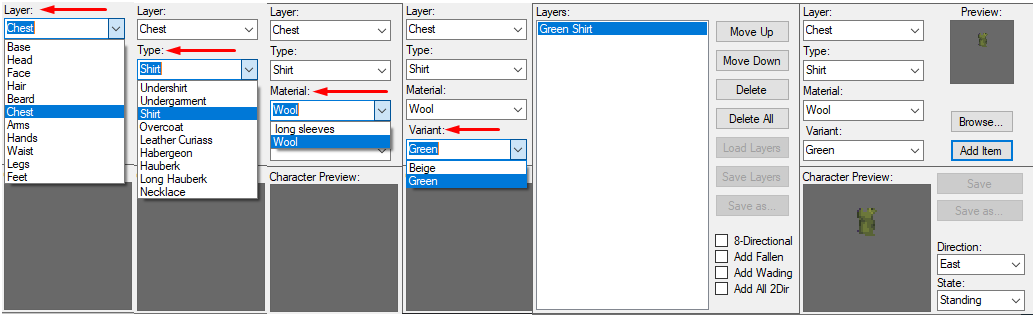
[Tool] Character Designer v1.1.0b A nice little tool that allows you to combine and layer different apparel for custom pc-male and pc-female sprite sheets. Comes packaged with over 140 unique default sprites for designing your dream character. Created by myself and @Krutzelpuntz who provided some amazing 8 direction sprites for this project, as well as testing for bugs and providing great feedback. Major props to him for his amazing work. Menu: 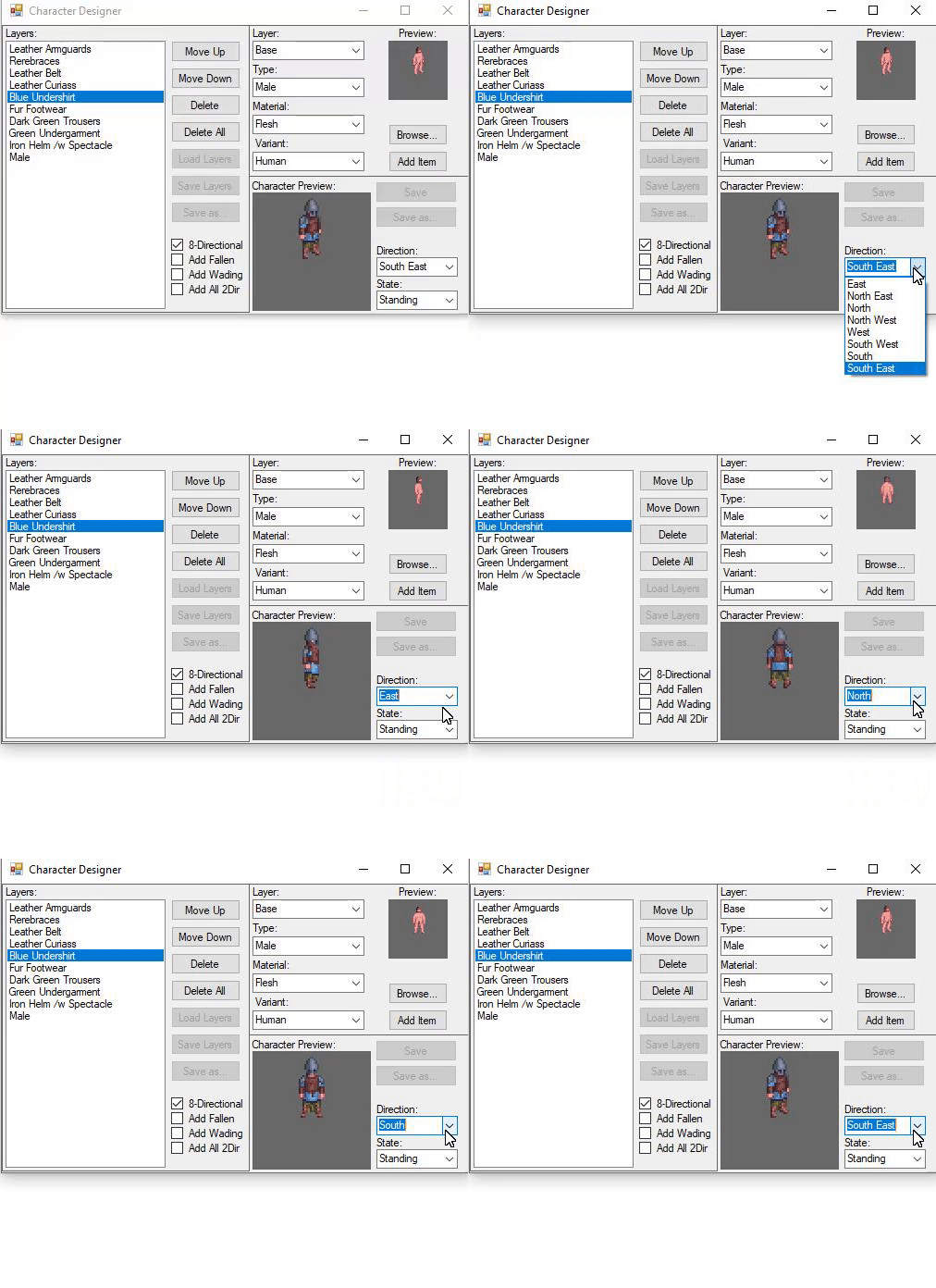 Instructions:
Future goals:
Please report any bugs to me via this thread, my PMs, or contact me directly on steam: https://steamcommunity.com/id/Nightipoo/ Fandom homepage: URWCharacterDesigner Wiki Download attached to thread. (Only registered viewers may see downloads) Credits: Night - Creator/Programming. Krutzelpuntz - Creator/8-Directional sprites, testing, constructive feedback. Enormous Elk - Unreal world. Requires Microsoft .NET Version 4.6 or later. (Usually already installed) >Source for study< October 13, 2020, 06:58:31 AM |
1 |
|
Re: Potential bug with Njerpez "Raids"
First, to answer your question: Quote Please tell me if villagers are supposed to be hostile towards Njerpez, or I was just doing something wrong. Yes, villagers are supposed to be hostile towards Njerpez. Or more precisely, they are supposed to protect their settlements from the Njerpez. But all in all, they shouldn't ignore the raiders entering their property - but they should fight back. So there's something here that doesn't quite match. Quote 5. Dog and Njerpez ran in house, but the women who were sleeping woke up. Even though the dog was definitely Njerpez, as well as the Njerpez in front of me attacking me, the women just went back to sleep without attacking. Villagers don't consider dogs their enemies, unless the dogs behave like that towards them. But as for the woman going to sleep right away, even though there's enemy and combat situation going on next to her ... that's a bit weird and ignorant. Only explanation I could think of would be that she was really dead tired, and couldn't help passing out immediately. Now I don't know how many turns she slept before your character died... but if it lasted for a long time she should still have woken back up and join the fight. Quote 3. Proceeded to chase Njerpez raider, but a Kaumo peasant attacked me. He ceased his attacks a short while later saying "There! Will you behave now?" or something similar. This part is also a bit weird. The peasant's line is something the villagers say when the character has been attacking or harrassing them. But this shoudn't happen if only the raiders were attacked. If you had accidentally attacked one of the villagers that might explain this, and maybe even also the latter morale confusion the sleepy village woman was experiencing. Even if the character died, there should be msglog.txt in their ANCESTORS/ folder. If you could dig that out I'd be happy to read in detail about how the events went. And maybe to get on track with the possible issues then. November 01, 2024, 01:33:42 PM |
1 |
|
Re: Custom Tiles not showing (FIXED)
You can use F9 ingame to reload truetile files for easier testing purposes.
September 09, 2025, 02:07:36 AM |
1 |
Re: [Fixed - 3.86] New submenus in menudef_ fail to display diy_ recipes
Greetings! Is this still broken? It seems to still be an issue, since my BAC submenus dont display anything, and my custom submenus dont either. Im on windows playing on version 3.86.1. Yes it's still broken, the bug persists in current version 3.86.1. September 09, 2025, 10:07:42 AM |
1 |
|
Re: Is it possible to create recipes that create 2 objects?
Modding doesn’t allow for that, only hardcoded recipes (cutting a log of trunk and so on) have multiple outputs. For your Njerpez skull recipe, you could do same as most carcass handling ones do: don’t remove the carcass/remains. Don’t run the recipe more than once per remains. September 10, 2025, 03:59:33 AM |
1 |
|
Re: Is it possible to create recipes that create 2 objects?
If you mess w/ memory hacking at all you can program the behaviors yourself. For example, I've made a working prototype for item containers, recipes you can 'learn' and recipes that are only available to use when a certain NPC is within range. heres a video of the container prototype: https://www.youtube.com/watch?v=rQQu_Ndc1kc from my original thread: 
September 13, 2025, 08:06:52 PM |
1 |